

Ruijie Reyee Expansion Connect Pack 1 Starlink Or NBN STL-RJ-00003
Ruijie Reyee Expansion Connect Pack 1 Starlink Or NBN STL-RJ-00003
Couldn't load pickup availability
Expand and enhance your existing Starlink setup with our specifically tailored Starlink Wi-Fi Expansion Bundles. Designed to complement and extend the WiFi reach of your Starlink internet connection, these bundles are ideal for users looking to expand their network coverage to more remote or extensive areas of their property.
Key Features:
-
Extend Your WiFi Network Between Buildings
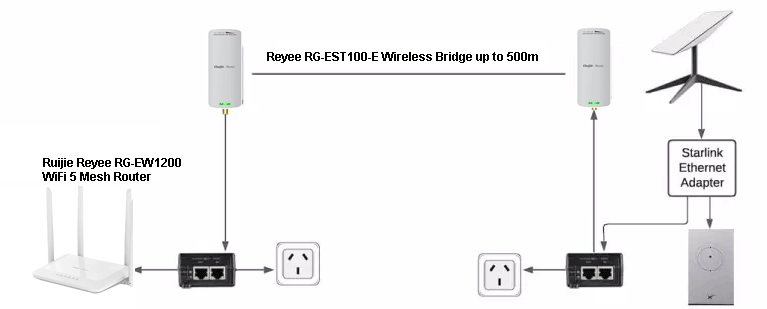
Tailored options for wirelessly expanding your network up to 500m away to another building using a RG-EST100-E wireless bridge. Instead of running a 500m cable use a wireless bridge. The RG-EW1200 Mesh Router then provides WiFi 5 coverage around the second building. -
High-Performance Equipment
Each bundle includes state-of-the-art networking devices for maximum reliability, coverage and speed. -
Seamless Integration
Designed to work effortlessly with your existing Starlink setup. -
Easy Setup and Management
User-friendly interfaces and simple installation processes.
Pack Includes
- Ruijie Reyee RG-EST100-E, 2.4GHz Dual-Stream - 500m Wireless Bridge (Pre-Paired Pack)
- Ruijie Reyee RG-EW1200 Dual-Band WiFi 5 Mesh Router
- CAT5e Network Patch Lead RJ45, Blue, 1m
- CAT5e Outdoor UV stabilised Pre-made Patch Cable, 10m
Enhance your Starlink network with a dependable expansion solution that brings fast, stable wireless connectivity to every corner of your property.
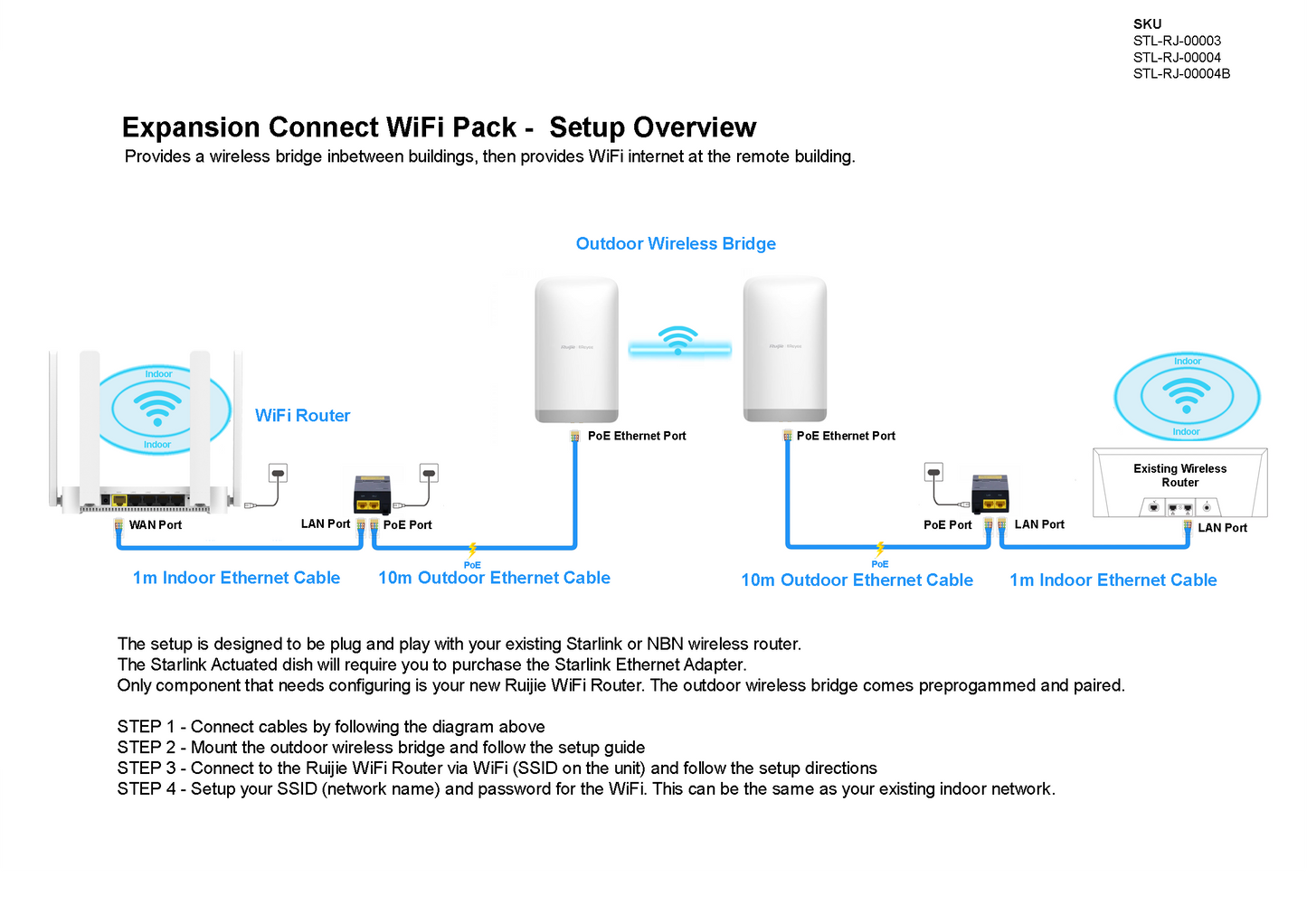
Expansion Connect WiFi Pack - Setup Overview
Provides a wireless bridge inbetween buildings, then provides WiFi internet at the remote building.
The setup is designed to be plug and play with your existing Starlink or NBN wireless router.
The Starlink Actuated dish will require you to purchase the Starlink Ethernet Adapter.
Only component that needs configuring is your new Ruijie WiFi Router. The outdoor wireless bridge comes preprogammed and paired.
STEP 1 - Connect cables by following the diagram
STEP 2 - Mount the outdoor wireless bridge and follow the setup guide
STEP 3 - Connect to the Ruijie WiFi Router via WiFi (SSID on the unit) and follow the setup directions
STEP 4 - Setup your SSID (network name) and password for the WiFi. This can be the same as your existing indoor network.
Share